


What Business Owners Need to Know About DIY Website Platforms
- Wix, Squarespace, and WordPress make it possible to get a business online without a developer, and for a lot of businesses, that was exactly the right call early on.
- The platforms are not the problem. How much time and expertise you can give them is.
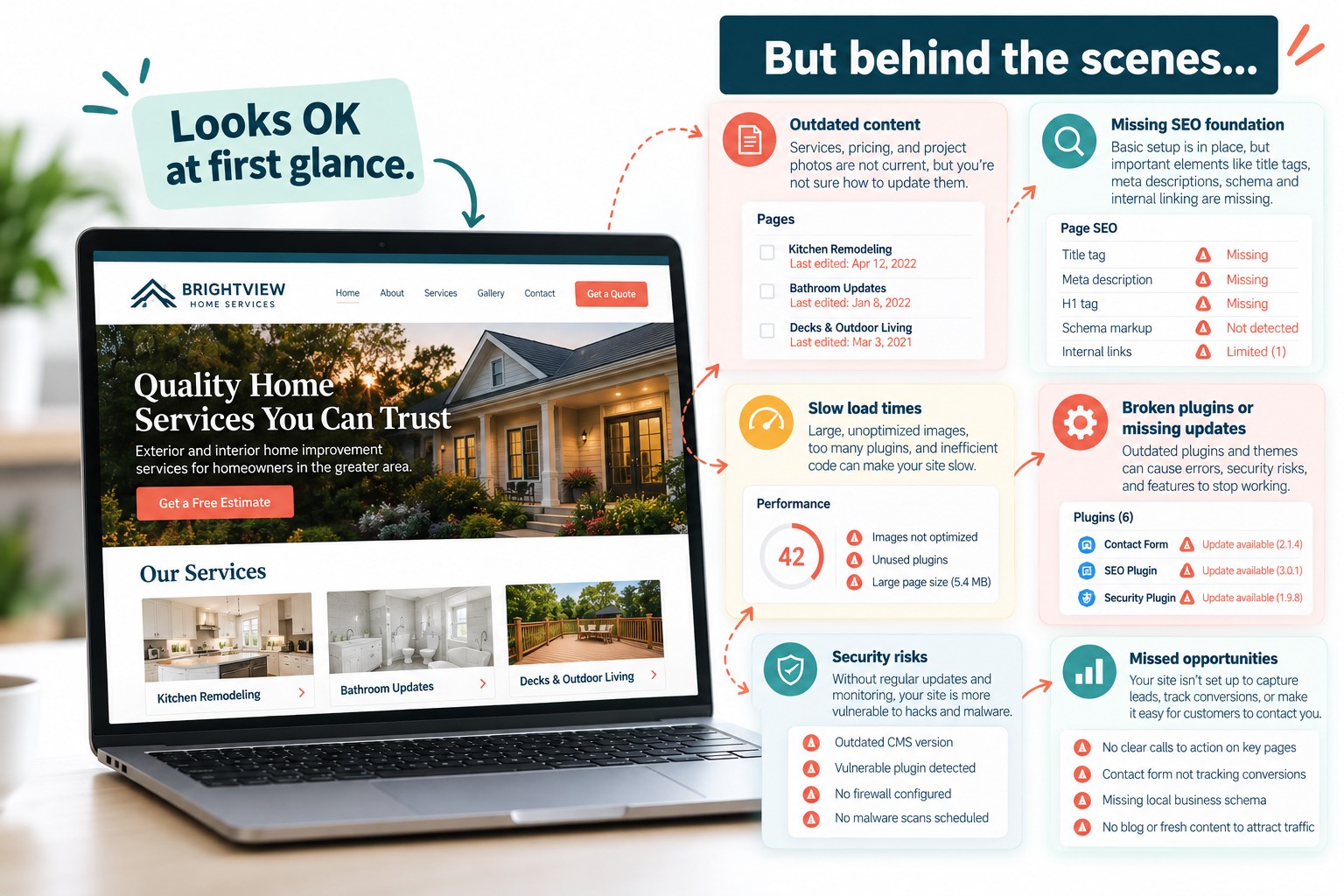
- A DIY site starts working against you when it stops keeping up with your business: outdated content, slow load times, no real SEO foundation, and a design that no longer reflects what you do.
- The signs are usually quiet. A service page you keep meaning to update. A layout change you can’t figure out. An afternoon lost to a broken plugin.
- If there is something on your site you have been meaning to fix for six months, that is worth paying attention to.
You built your website yourself because it made sense at the time. You needed something up, the budget was not there for a developer, and Wix or Squarespace or WordPress made it possible to get online without a technical background. That was the right call. A lot of businesses have done exactly the same thing.
But websites are not one-time projects. They need to be updated, optimized, and maintained, and the question is not whether your platform can handle that. It is whether you can.
Here is how to tell if your DIY site has started working against you.
When a DIY Site Becomes a Liability
Every platform on this list has helped real businesses get online and grow. They are also all designed around the assumption that someone will keep up with them. When that stops being true, the platform stops being an asset.
The harder problem is what you can’t see. A site that looks fine on the surface can still be loading slowly on mobile, missing the structured data that helps search engines understand what you do, or serving up images with no alt text and pages with no clear hierarchy. These aren’t cosmetic problems — they’re the signals search engines and AI tools use to decide whether your business is worth surfacing. With AI Overviews now pulling answers directly from web content, a site that bots can’t read easily is a site that doesn’t exist in those results.
Signs Your Wix Site Has Hit Its Ceiling
Wix gives you a lot of flexibility over design and layout, which is genuinely useful when you are setting things up. That same flexibility becomes a liability when you do not have time to use it, and the site starts to drift.
You haven’t touched it in over a year
If your site still shows services you no longer offer, prices that have changed, or photos from a project you finished two years ago, it is working against you. Customers who find you online are making a decision before they ever contact you. Outdated content tells them nobody is minding the store.
Your SEO is mostly guesswork
Wix has a built-in SEO setup wizard that walks you through the basics. Title tags, meta descriptions, the fundamentals. What it does not cover is site architecture, page speed, structured data, or the kind of local SEO foundation that actually moves the needle in search results. If you have not gone beyond what the wizard prompted, there is a good chance your site is not ranking for much.
The design no longer fits your business
A template that looked clean and professional three years ago can start to feel generic fast. If your business has grown, added services, or moved upmarket since you built the site, a template you can only stretch so far may not be telling the right story anymore.
When Squarespace Starts Working Against You
Squarespace tends to attract businesses that care about how things look, and it delivers on that. The templates are well-designed and the interface is clean. The tradeoff is that what you see is largely what you get, and the platform is intentionally limited in ways that start to show when your needs get more specific.
You keep running into things you can’t customize
Squarespace templates are built around specific layouts, and moving outside them means workarounds that are not always stable. If you have found yourself wanting to add a feature, change a layout element, or integrate a third-party tool and hit a wall, you have reached the edge of what the platform offers without custom development.
Your site looks good but isn’t generating inquiries
Squarespace sites tend to look polished, but looking polished and converting visitors into customers are different things. If your site is getting traffic but not generating calls or contact form submissions, the issue is usually structure: where the phone number sits, whether there is a clear next step on every page, how easy it is for someone to find what they need. These are solvable problems, but solving them inside Squarespace’s constraints takes more effort than it should.
Your business has grown beyond what a template can communicate
Squarespace works well for businesses that fit neatly into one of its template categories. If your services have expanded, you have added a team, or you are trying to reach more than one type of customer, a single template structure may be forcing compromises in how you present your business.
When WordPress Becomes More Work Than It’s Worth
WordPress is the most powerful of the three and also the most demanding. A basic install through a host like GoDaddy is not hard to set up, and with a standard theme it is possible to get something decent-looking without a developer. What most business owners underestimate is what happens next.
Updates keep piling up, and you keep ignoring them
WordPress core, your theme, and every plugin you have installed all release updates on their own schedules. Skipping them is not a neutral choice. Outdated plugins are one of the most common ways WordPress sites get hacked or broken. If your dashboard has a stack of update notifications you have been putting off, that is a risk sitting in the background of your business.
Something broke, and you lost half a day fixing it
This is the one that tends to push business owners over the edge. A plugin update conflicts with your theme. A form stops working. The site goes down and you have no idea why. WordPress gives you a lot of control, but that control comes with responsibility, and troubleshooting a broken WordPress site is not how most business owners want to spend a Tuesday morning.
You’re paying for hosting but not getting much from your site
A WordPress site that was set up once and left alone tends to accumulate technical debt quietly. Plugins you no longer use, a theme that has not been updated in years, images that were never optimized for web. The site works well enough that it does not feel urgent, but it is also not doing much for you in search results or converting the visitors who do find it.
DIY Website Platforms Compared
| Platform | Good for | Where it breaks down |
|---|---|---|
| Wix | Getting online quickly, simple service businesses with straightforward needs | SEO ceiling, templates that are easy to let drift, low-friction neglect |
| Squarespace | Design-forward businesses, photographers, consultants, anyone who prioritizes how things look | Customization walls, conversion structure limitations, not built for growth |
| WordPress (DIY) | Business owners who want more control and are willing to learn | Plugin maintenance, update management, breaks when ignored, troubleshooting eats time |
| WordPress (professionally managed) | Businesses that are ready to stop fighting their site and focus on their work | Requires a partner, not just a platform — which is exactly the point |
Why We Recommend WordPress Regardless of Where You’re Starting
If you are on Wix or Squarespace and ready to make a change, the answer is almost always WordPress. Not because the other platforms are bad, but because WordPress is the only one that grows with you without forcing you into a corner.
A professionally built WordPress site gives you full control over your content, your design, and your SEO. There are no template boundaries to hit, no platform fees that increase as your site grows, and no proprietary system that makes it harder to move or change things later. The content you publish lives on your site, not inside a platform that could change its pricing or features at any time.
The reason DIY WordPress installs run into trouble is not the platform. It is the maintenance, the plugin management, and the technical decisions that most business owners were never set up to handle in the first place. When a professional builds and manages your WordPress site, those problems go away. You get the power of the platform without the Tuesday morning troubleshooting sessions.
If you are already on WordPress and your site is underperforming, a rebuild is not always necessary. Sometimes the foundation is solid and what you need is cleanup, updated SEO structure, and someone keeping up with the maintenance so you do not have to.

How Trebletree Can Help
I have talked to a lot of business owners who are in exactly this spot. They know their site is not doing what it should. They have a list of things they meant to fix months ago. And every time they sit down to deal with it, something more urgent comes up, or they spend an hour in the page editor and give up because it is just not worth the fight.
That frustration is completely reasonable. You built a business because you are good at what you do, not because you wanted to become a part-time web developer.
That is the problem we solve. Our local website program is built for businesses that have a site, know it could be better, and are ready to hand it off to someone who will actually keep it running. We handle the updates, the SEO foundation, and the maintenance so you can stop thinking about your website and get back to the work that actually grows your business.
If you are not sure where to start, we can take a look at what you have and tell you exactly where the gaps are before you make any decisions.