

What Local Businesses Need to Know About GBP going into 2027
- Your Google Business Profile is the most visible piece of local real estate you control. It shows up before your website in most local searches, and it is free.
- Completeness is table stakes. Profiles with complete information see 10-15% more direct calls than incomplete ones, according to BrightLocal research.
- Reviews are now a top-five local ranking factor. Recency matters as much as volume: a steady stream of recent reviews outperforms a pile of old ones.
- Your primary business category unlocks features that secondary categories do not. Choosing the right primary category is one of the highest-leverage decisions you can make.
- GBP won’t go away in 2027. Google continues to invest in it as the anchor of local search. Getting your profile right now pays forward.
If someone searches for your business today, Google Business Profile is probably the first thing they see. Not your website. Not a review site. Your GBP listing: your name, hours, phone number, photos, and the reviews you have collected. That panel controls the first impression for a huge share of your potential customers, and most businesses are leaving it half-done.
This guide covers everything you need to get your GBP profile working the way it should, from the basics of completeness to the category-specific features most businesses never set up. It is written for business owners, not marketers, so we will skip the jargon and tell you what to actually do.
Why GBP Still Matters (More Than You Think)
Google Business Profile signals account for roughly 32% of what determines whether you show up in the local pack, the three-result map block that appears at the top of local searches, according to Whitespark’s 2026 Local Search Ranking Factors report. That makes GBP the single largest category of local ranking signals, ahead of links, on-page SEO, and citations.
For most local searches, the local pack appears in over 90% of results. AI Overviews, the generated summaries that have gotten a lot of attention, show up in only about 15% of searches with local intent. The map pack is still where local search happens. Getting your GBP right is the most direct path to showing up there.
GBP is not going away in 2027. Google has continued expanding its features and tightening its data requirements. Businesses that treat it as a one-time setup are already falling behind those that keep it current.
Profile Completeness: The Foundation
An incomplete profile is a missed opportunity. BrightLocal’s research shows that businesses with fully completed profiles see 10-15% more direct calls than those with gaps. The math is simple: give Google everything it wants, and Google gives you more visibility.
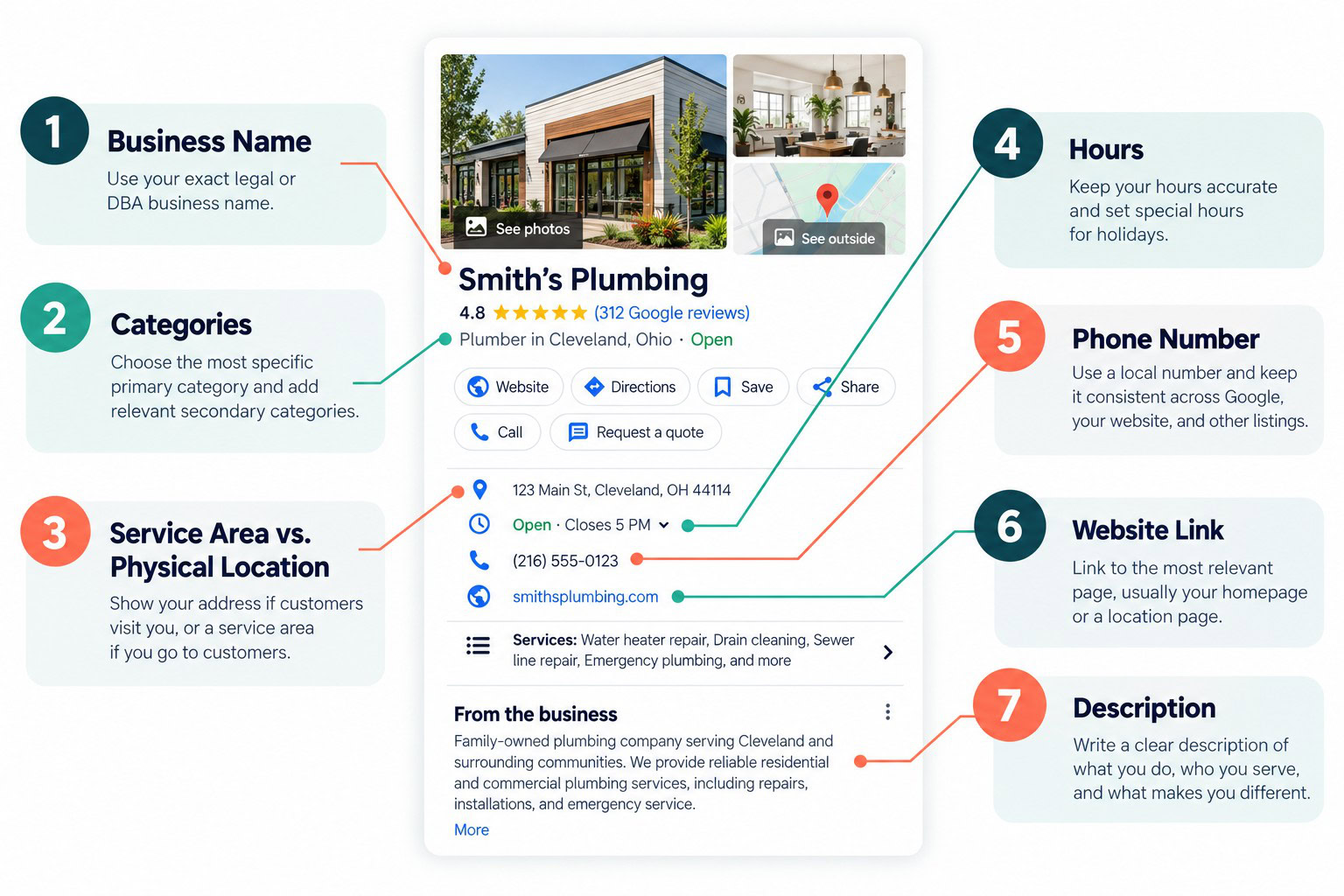
Business Name
Use your exact legal or DBA business name. Do not add keywords, locations, or descriptors to your business name field. “Smith’s Plumbing” is correct. “Smith’s Plumbing – Best Plumber in Cleveland” is a violation of Google’s guidelines and can get your listing suspended.
Categories
Your primary category is the most important category choice you make. It determines which search queries you are eligible to appear for, and it unlocks category-specific features that secondary categories do not. Choose the most specific primary category that accurately describes your main business activity.
Secondary categories expand your relevance but do not carry the same weight. A plumbing company might list “Plumber” as primary and add “Water Heater Repair” and “Drain Cleaning Service” as secondary. Do not add categories that do not genuinely apply to your business.
Service Area vs. Physical Location
If customers come to your location, set your address. If you go to customers (home services, mobile businesses), set a service area instead. Showing both when you are primarily a service-area business can confuse Google and dilute your ranking in the areas where you actually work.
Hours
Keep your hours accurate and up to date. Set special hours for holidays. Google surfaces businesses that are open now, and incorrect hours create bad first impressions and can hurt your ranking. If your hours change seasonally, update them when they change.
Phone Number
Use a local phone number if you have one. Tracking numbers are allowed but should be set as the primary number only if you have a corresponding local number listed as well. Your phone number across Google, your website, and your other listings should be identical, including formatting.
Website Link
Link to the most relevant page for each context. For your main listing, your homepage is usually right. If you have created location-specific landing pages, link to those. The page you link to should reinforce the information in your profile.
Description
You get 750 characters for your business description. Use them. Write a clear description of what you do, who you serve, and what makes your business worth calling. Include relevant keywords naturally, but write for the human reading it, not the algorithm. The first 250 characters are what show by default before the “more” link.
Photos and Visual Content
Listings with photos receive significantly more direction requests and website clicks than those without. Photos also give Google more signals about your business, your team, and your space.
Cover Photo and Logo
Your cover photo is what appears at the top of your knowledge panel. Use something that clearly represents your business: your storefront, your team at work, or a signature service in action. Your logo should be clean and legible at small sizes. Both images should be high resolution.
Interior and Exterior Photos
Add photos of the inside and outside of your location if customers come to you. Exterior photos help customers find you. Interior photos set expectations and build confidence before someone walks in.
Don’t depend on your customers’ photos or Google street view. This is you chance to show off your business and you don’t want to depend on someone else’s blurry photo.
Photo Tip: Take your photos in good natural light and a smart photo is plenty. If you’ve got parking out front, snap a shot first thing before you open or as you head out the door to avoid a bunch of cars distracting from your shot. Inside, make sure you clean up any clutter before snapping that shot.
Team Photos
Photos of real people doing real work outperform stock photos in almost every study of GBP engagement. If you can get photos of your team in action, add them. Customers are sizing you up before they call, and a face-to-face connection starts here.
Product and Service Photos
For businesses where the work is visual, before-and-after photos, completed projects, and product shots are high-value additions. For service businesses, photos of your truck, your equipment, or a job site tell a story that a logo cannot.
Keep Photos Fresh
Google can tell when photos were added. A profile with dozens of photos from 2019 and nothing since reads as abandoned. Add new photos regularly, even just a few per month. This signals to Google that your business is active.
Reviews: The Factor That Keeps Growing in Importance
Reviews have moved up significantly in local ranking factor studies. Whitespark’s 2026 research shows review signals now account for 20% of local pack ranking factors, up from 16% in 2023. Review recency jumped from factor #93 to #11 in the same period. That is a significant shift.
Volume, recency, and response rate all factor in. A business with 200 reviews but none in the last six months is losing ground to a competitor with 80 reviews and 10 in the last 30 days. The algorithm weights freshness heavily.
How to Get More Reviews
Ask. That is the most effective method, and most businesses are inconsistent about it. Build a review request into your post-job process. Send a follow-up text or email with a direct link to your GBP review page. Make it easy.
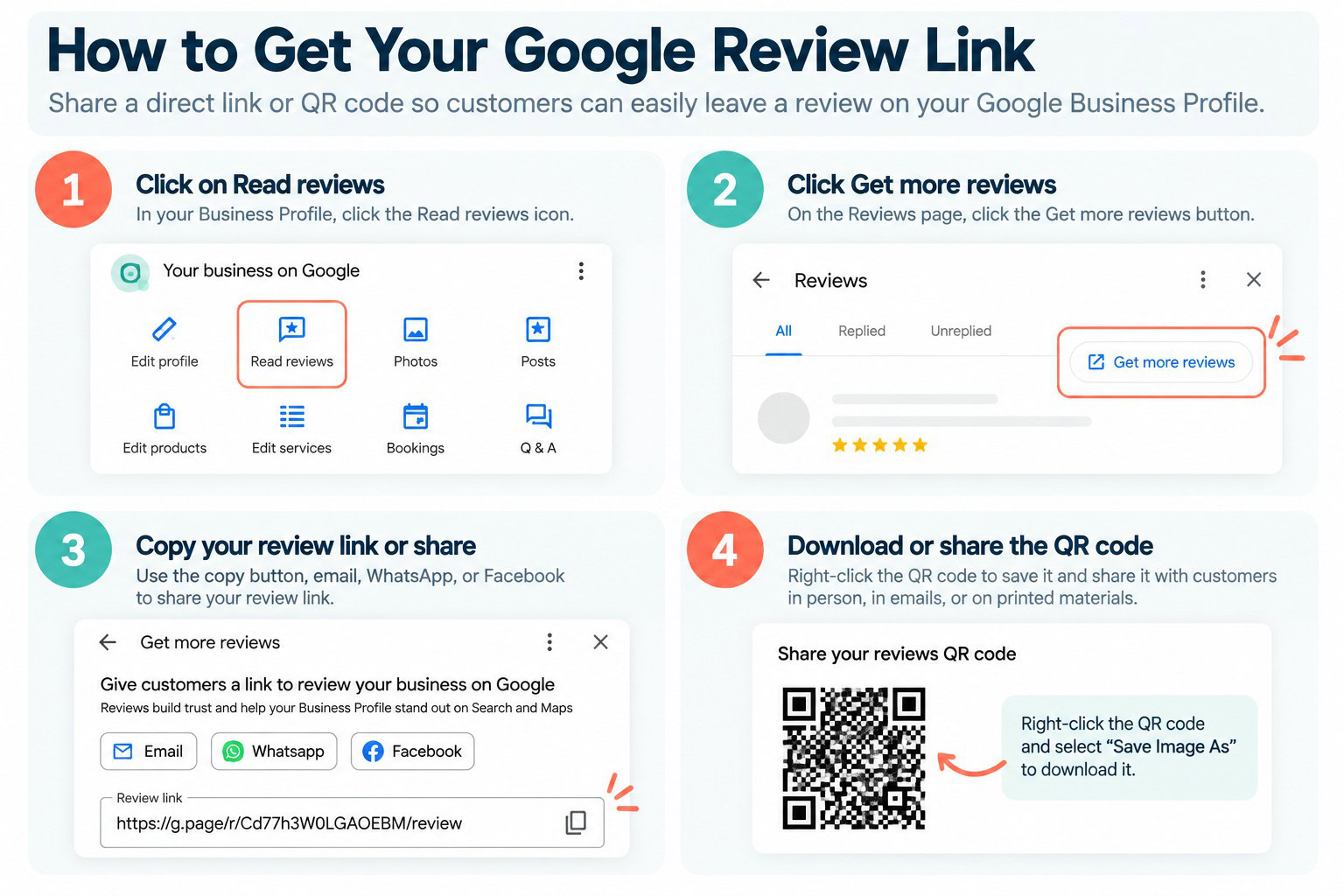
Google makes this easy by giving you a link and even a QR code to share with your customers. QR codes are great for signage in businesses where the review can be immediate (like a restaurant or retail store). Many reputation management systems make it easy to request reviews and you can even set-up workflows that automatically send review requests out to customers.
How to Respond to Reviews
Respond to every review, positive and negative. For positive reviews, a brief, specific thank-you is enough. For negative reviews, acknowledge the concern, take it offline if possible, and keep your tone professional. Your response is public. Future customers will read it.
Do not copy and paste the same response to every review. Google can detect patterns, and it reads as inauthentic to customers. Vary your language and reference something specific from the review when you can. AI can automate some of this, but when it comes to a negative review, someone on your team should always have eyes on it.
Google Business Profile Posts
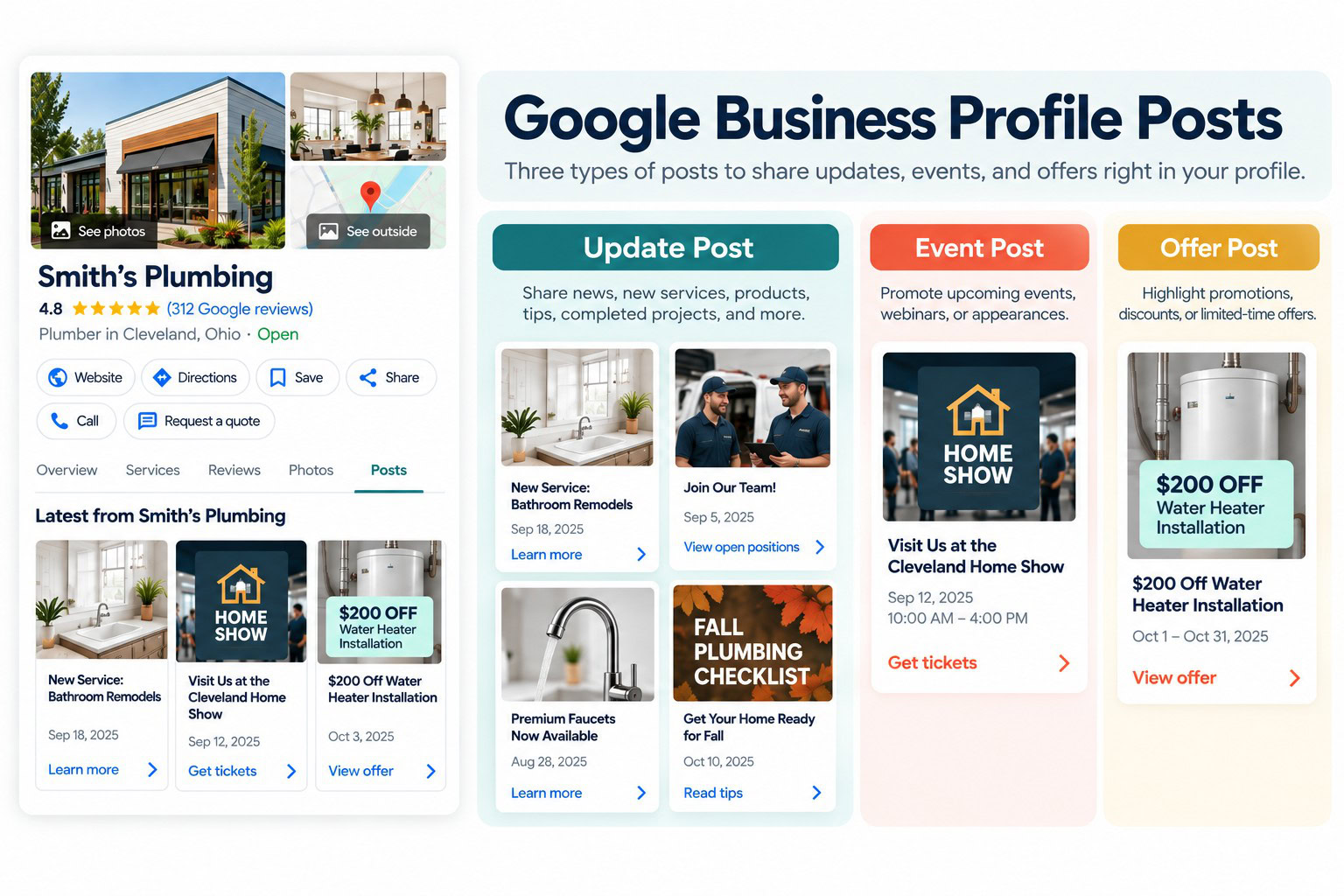
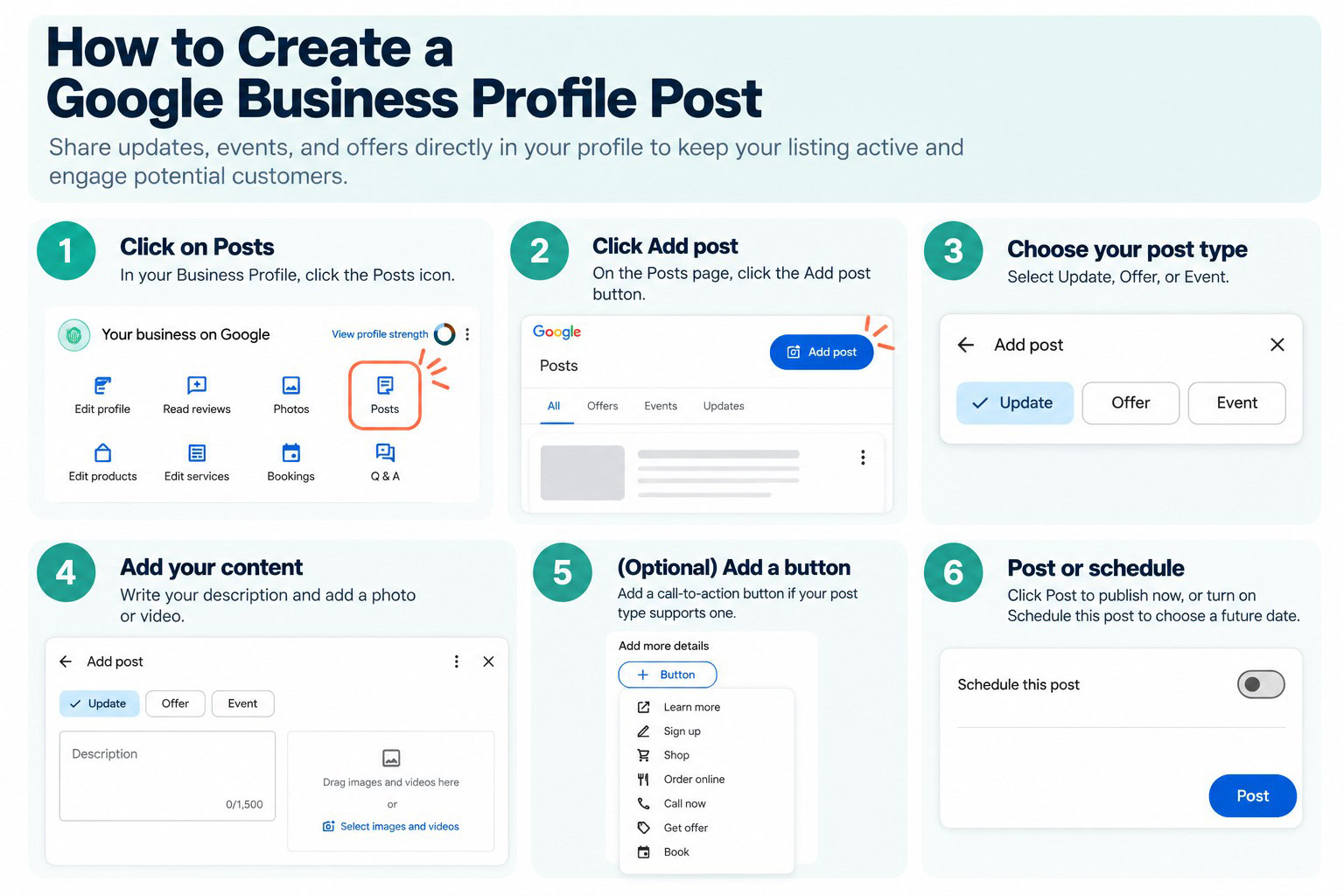
Posts are the feature most businesses set up and then forget. They live in your knowledge panel and give you a way to push fresh, timely content directly to searchers without going through your website.
What to Post
Promotions and offers, new services or products, seasonal reminders, completed projects, events, and team news all work well. Keep posts short and direct. Include a photo when you can. Add a call-to-action button if your post type supports one.
Post Frequency
Posting at least twice a month is enough to keep your profile looking active. Weekly is better. Posts expire after a period and drop out of view, so consistency matters more than volume.
Efficiency Tip: If you are posting frequently to your block, schedule a GBP post as soon as you publish your blog. It’s a great way to keep your GBP fresh and get some visibility for your new blog content. We do this with our own content and clients we’re developing content for.
Ask Maps: What Replaced Q&A
Google’s Questions and Answers feature was discontinued on November 3, 2025. It has been replaced by Ask Maps, a Gemini-powered tool that Google began rolling out in March 2026.
Ask Maps lets users ask specific questions about a business directly in Google Maps, and Gemini generates answers from a combination of the business’s GBP information, reviews, website content, and other Google-indexed data. Businesses do not manage Ask Maps responses directly the way they could respond to Q&A entries.
What this means for your GBP strategy: the information Google uses to answer Ask Maps questions comes from your profile, your website, and your reviews. A complete, accurate profile with clear service descriptions and consistent information across your website and listings will produce better AI-generated answers. Gaps and inconsistencies in your data will show up in incorrect or unhelpful answers to customer questions.
Attributes: The Fields Most People Skip
Attributes are additional fields that provide searchers with specific information about your business. Many are only available for certain categories, but several apply broadly. Most businesses either miss them entirely or fill them in inconsistently.
Payment Options
Specifying which credit cards, digital payments, and payment types you accept helps customers know what to expect. If you take Apple Pay or do not accept American Express, say so. Customers ask, and your profile is where they look.
Accessibility
Wheelchair-accessible entrance, parking, restroom, and seating attributes are available for most business types. Filling these in helps customers who need that information find you, and Google surfaces this in accessibility-filtered searches.
Identity Attributes
Attributes like “Women-owned,” “Veteran-owned,” and “LGBTQ+-friendly” are available and visible in search results. If they apply and you want to highlight them, add them. Some customers specifically filter for these. Trebletree is proud to be women-owned and founded so we made sure that women-owned attribute appears on our profile.
Service Options
Online appointments, online estimates, in-store shopping, curbside pickup, delivery, and other service method attributes help customers understand what your business offers before they contact you. Fill in everything that applies accurately.
Language
If your business serves customers in languages other than English, set your language attributes. This can surface your listing in searches by speakers of those languages and signals a welcome to a broader customer base.
Social Links, Booking, and Chat
GBP lets you connect more than just a website. Most businesses never touch these fields.
Social Profiles
You can add links to your Facebook, Instagram, LinkedIn, X, YouTube, Pinterest, and TikTok pages directly in your profile. Google displays these in your knowledge panel, and they give searchers a fast path to see how active your business is. Go to “Edit Profile” and look for the social links section. Add every profile you actually maintain. Skip the ones you abandoned in 2021.
Booking Integration
If you use a booking tool, Google can surface a booking button directly in your listing. Supported integrations include Square Appointments, Booksy, Vagaro, Fresha, and a growing list of others. For home service businesses, some scheduling tools connect as well. If your booking system is on the supported list, connecting it removes one step between a searcher and a confirmed appointment.
Messaging
GBP has a built-in chat feature that lets customers message you directly from your listing. It works if you are genuinely set up to respond quickly, and it is a liability if you are not. Google monitors response times, and a slow average can reflect poorly on your listing. Turn it on only if someone on your team will actually check it. If that is not realistic, leave it off. A disabled feature is better than an ignored one.
Category-Specific Features
Your primary business category unlocks features that are not available to all businesses. These go well beyond basic profile fields and include things like menu editors for restaurants, vehicle inventory feeds for dealerships, and booking integrations for service businesses.
Most businesses either do not know these features exist or never complete them after choosing a category. Setting them up is one of the highest-leverage things you can do, because competitors who have not done it are invisible in filtered searches that use these fields.
| Business Type | Category-Specific Features Available |
| Restaurants & Cafes | Menu editor, dish photos, reservations link, dine-in/takeout/delivery attributes, popular dishes highlight, ordering integration |
| Hotels & Lodging | Amenities checklist (pool, WiFi, parking, pet-friendly), star class display, check-in/out times, room photos by type, hotel-specific attributes |
| Healthcare / Medical | Appointment booking, telehealth attribute, insurance accepted (in some markets), individual provider profiles under the practice listing |
| Law Firms | Areas of practice listing, consultation booking, attorney profiles, license number display |
| Retail Stores | Product catalog with photos and prices, in-store/pickup/delivery options, brand attributes, featured product highlights |
| Auto Dealerships | Vehicle inventory feed, new/used/certified designation, make and model filters, test drive booking link |
| Real Estate Agencies | Active listing display, open house scheduling, agent profiles, buyer/seller/rental designation |
| Salons & Spas | Service menu with pricing, staff profiles, booking integration (Booksy, Vagaro, Fresha, Square), before/after photo section |
| Home Services | Service area map display, license and insurance badge fields, financing available attribute, service category tags |
| Event Venues | Event calendar, capacity fields, room/space photos by type, inquiry/booking link, catering and AV attributes |
Note: feature availability varies by market and Google rolls out category-specific features on an ongoing basis. Check your GBP dashboard under “Edit Profile” to see what is available for your specific category. Features not listed above may have been added since publication.
Keeping Your Profile Accurate Over Time
A GBP profile is not a one-time setup. Hours change. Services expand. Staff turns over. Phone numbers get updated. Every time your business information changes in the real world, your GBP profile needs to reflect it.
Google also allows users to suggest edits to your profile, and some of those edits can be applied automatically. Review your profile every month or two to catch anything that has drifted. Set calendar reminders before major holidays to update special hours.
Handling Incorrect Edits
If you notice incorrect information in your profile that you did not put there, correct it immediately. Document what you changed. If the problem recurs, Google has a reinstatement process for listings that have been compromised.
Verifying Your Listing
An unverified listing cannot be fully managed and may be outranked by verified listings for the same business. If your listing is not verified, complete verification through Google’s current process (video verification has replaced postcard verification as the primary method for most business types).
Planning for 2027: What to Watch
GBP is not going away in 2027, but it is changing. A few things worth watching:
- Ask Maps is still early. Google is actively developing how it surfaces business information through AI responses. The businesses best positioned to benefit are the ones whose GBP profiles, websites, and reviews give Google clean, consistent, detailed information to work with. That is the same foundation that drives traditional local SEO.
- Review freshness will keep mattering. The jump in review recency as a ranking factor from 2023 to 2026 suggests Google is increasingly weighting recent activity over accumulated totals. Build a review collection habit now rather than trying to catch up later.
- Category features are expanding. Google regularly adds new category-specific features. Businesses that have their primary category set correctly will have access to new features as they roll out, without needing to make changes.
- Consistency across the web still matters. GBP does not operate in isolation. Your name, address, and phone number across other directories, your website, and social profiles all feed into how Google evaluates your business. Clean up inconsistencies now.
If there’s one thing we’ve learned in 2026 it’s that Google is not going away even with AI search competitors moving aggressively. The easiest way to get your business noticed more in Google is to use Google’s features to their full extent.
How Trebletree Can Help
Trebletree’s local business program covers Google Business Profile setup, optimization, and ongoing management as part of a broader local search strategy. We look at your profile completeness, category setup, category-specific features, photos, review health, and how your GBP information aligns with your website and other listings.
If you want a clear picture of where your profile stands right now, we offer a free local presence audit. We look at your Google presence, listings, reputation snapshot, and website, then give you your top three priorities.
Our local SEO services and local website program are built around the same principles that drive GBP performance: accurate information, clear structure, and consistent signals across every place your business shows up online.